 Tasaheel ERP
Payroll and the Wage Protection System (WPS), Step by Step
How to run payroll in Saudi Arabia: basic, housing, transport, overtime and GOSI, the payroll entry, and the WPS bank file reconciled to payroll before upload.
 By Sherif Fadl — Founder, Tasaheel ERP
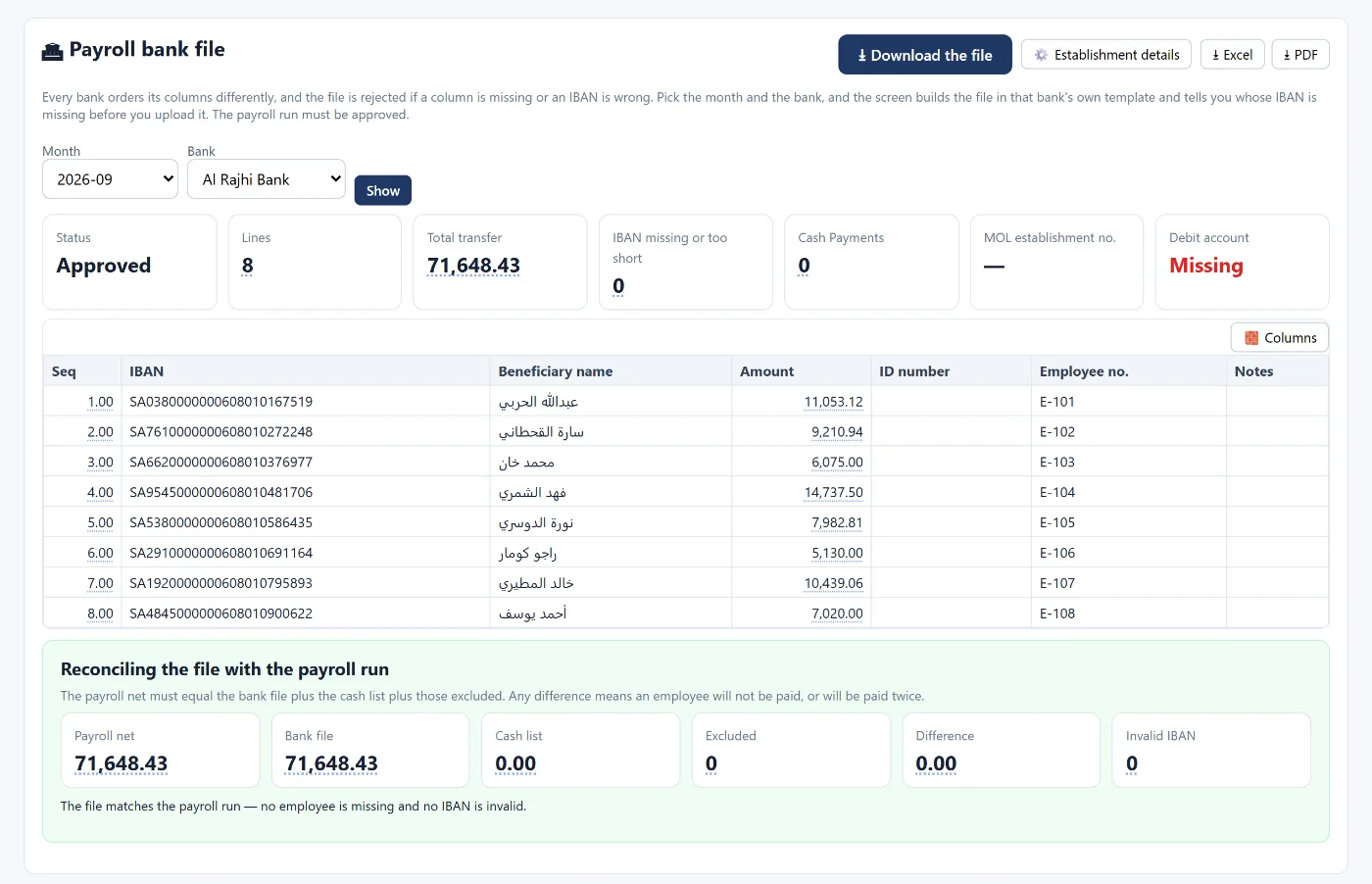
The Wage Protection System requires businesses to pay salaries through banks and to upload a monthly payroll file that matches what was actually paid. What delays salaries or causes violations most often: a missing or wrong IBAN, or a bank file that does not match payroll. This guide explains preparing payroll, the entry and the bank file step by step.
This article is general guidance. The official reference for wage protection requirements is the Ministry of Human Resources and Social Development and its platforms, and social insurance rates are set by GOSI.
Salary components
- Basic salary: the basis for social insurance and end-of-service benefits.
- Allowances: housing, transport and others.
- Monthly variables: overtime, bonuses, deductions and absences.
- Deductions: the employee's social insurance share, and advances.
Preparing payroll
- Fix each employee's data: salary and components, nationality (it affects social insurance), IBAN and ID number.
- Prepare the month's payroll with each employee's entitlements.
- Enter the month's variables: actual days, overtime hours, bonuses and deductions.
- Review totals against the previous month.
- Approve payroll and post its entry.
- Create the bank file and reconcile it with payroll before uploading.
The payroll entry
- Debit salaries and wages (gross)
- Debit employer social insurance share (expense)
- Credit salaries payable (net)
- Credit social insurance payable (employee + employer shares)
- Credit employee advances (if an advance is deducted)
On transfer: debit salaries payable, credit bank.
Reconciling the bank file with payroll
The golden rule: net payroll = bank file + cash payments + excluded employees. Any difference means an employee will not be paid, or will be paid twice. Before uploading, make sure:
- No IBAN is missing, short or invalid.
- The establishment details (establishment number and debit account) are complete per the bank's template.
- Anyone paid in cash is recorded on a separate sheet.
How Tasaheel Accounts runs payroll
- Employees: a card for each employee with details, hire date, salary and components, social insurance and IBAN, plus a statement for advances and custody.
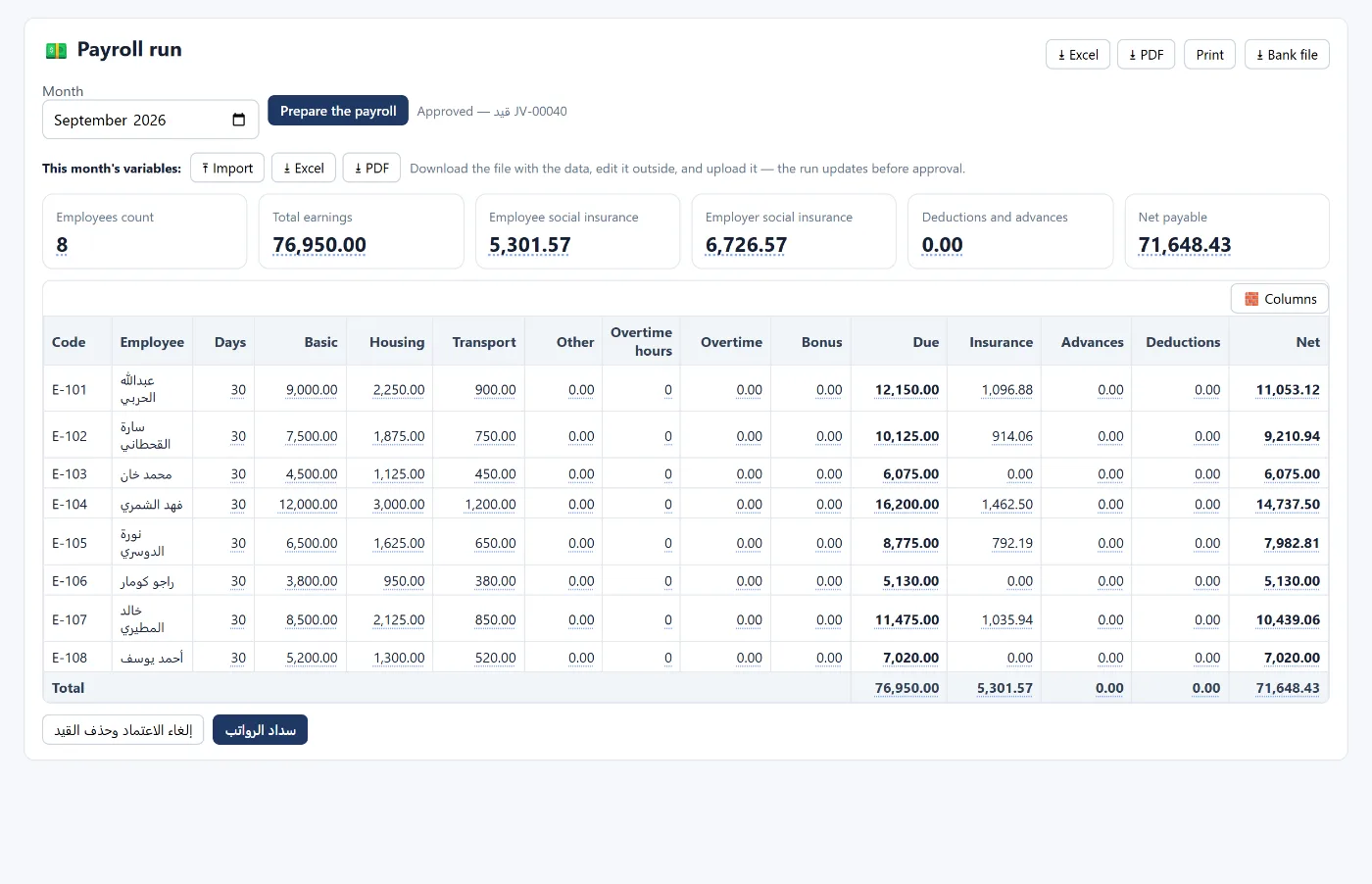
- Payroll run: prepare payroll brings each employee with their entitlements, you adjust days, overtime, bonuses and deductions, then preview and approve posts the payroll entry.
- Payroll bank file: choose the month and bank, and the screen builds the file in the bank's own template, flags missing or invalid IBANs and missing establishment details before upload, and reconciles the file with payroll — showing that the file matches payroll when no employee is missing and no IBAN is invalid.
Common mistakes
- An IBAN copied with one wrong digit, so the transfer is rejected.
- A new employee not added to payroll in their first month.
- Paying an employee in cash without a separate sheet, so the file does not match payroll.
- Changing a salary at the bank without changing it in payroll.
FAQ
What is the Wage Protection System?
A system that requires businesses to pay wages through banks and upload payroll data monthly, to verify that wages are paid on time and in full.
How do I make sure the bank file is right before uploading?
Reconcile it with payroll: net payroll must equal the bank file, cash payments and excluded employees, with no missing or invalid IBAN.
Does it calculate social insurance?
Yes, within payroll based on employee data, and the liability is recorded in the entry.
Does it support more than one bank?
Yes. You choose the bank and the file is built in its template.
Read also month-end close and provisions and end-of-service, or learn more about Tasaheel Accounts.
Try it in Tasaheel: create a free account, add your employees, and prepare your first payroll and bank file.