 Tasaheel ERP
Point of Sale: Opening and Closing Shifts, Z Reports, Cash Over/Short
A practical guide to retail POS: opening a shift with a float, selling by barcode with split payments, returns, closing by count, the Z report, and cash over and short.
 By Sherif Fadl — Founder, Tasaheel ERP
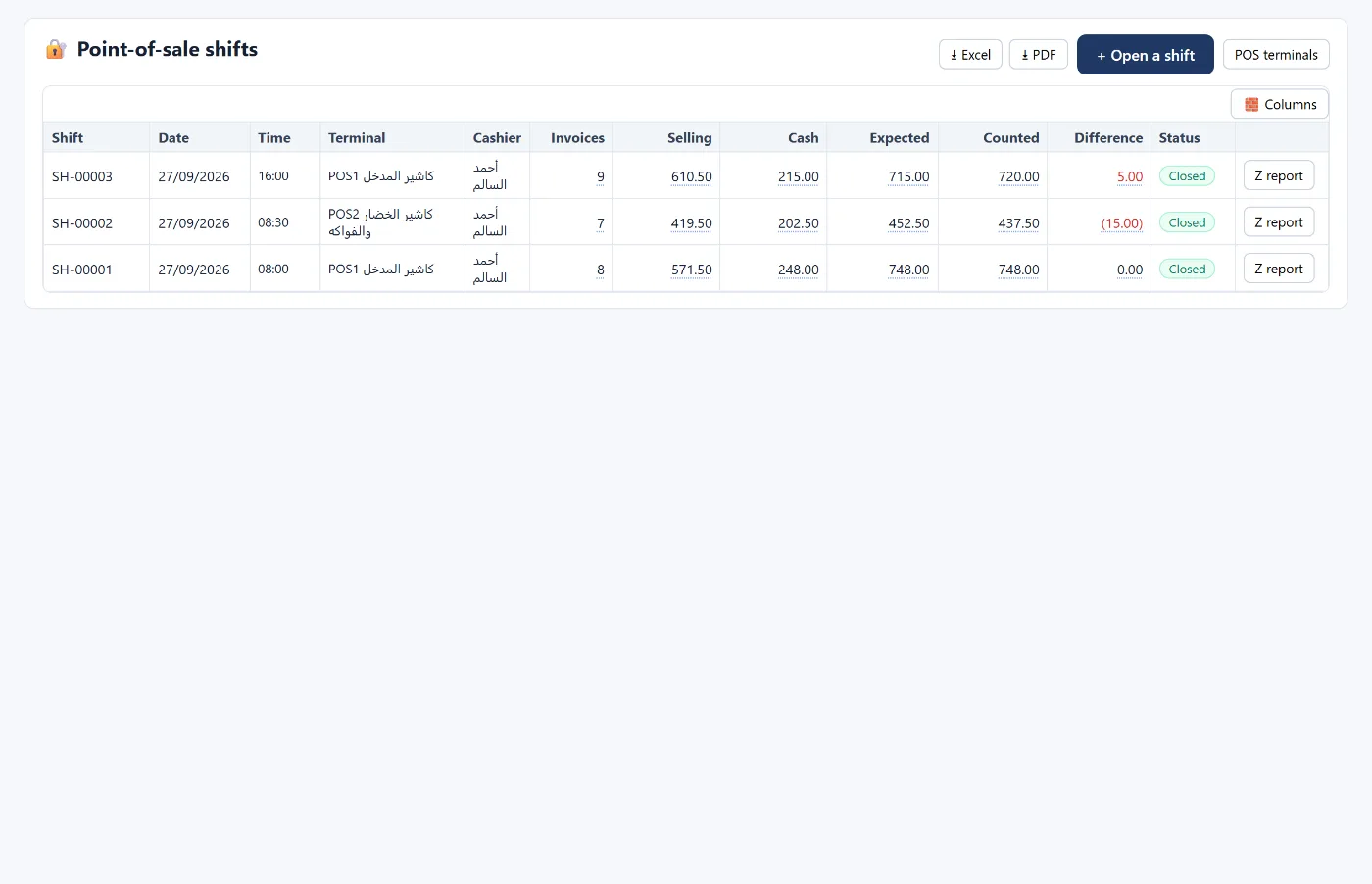
The shift is the unit of accountability at the till: who opened it, what was in the drawer, what was sold and by which payment method, and what should be in the drawer at close. This guide walks through the full shift cycle in a shop.
Opening the shift
The cashier counts the cash in the drawer and records it as the opening float. The float posts no entry, since it is cash already in the till, but it counts towards the expected amount at close.
Selling
- Search by name or code, or scan the barcode, in a single box.
- Split payment: part cash and part card (mada), for example, with change given in cash only.
- Payment methods (cash, card, credit card, transfer, delivery app, on account), each linked to its account, so amounts land in the right place.
- Hold an invoice to serve another customer, then return to it.
- An extra sales window for a second terminal on the same device.
Each invoice posts its entry: debit the payment methods (or the customer for credit sales), credit sales and output VAT, with stock issued and cost of sales recorded.
Returns
Picked from invoices in the last 14 days or by invoice number, for part or all of the quantity, with a reason, refunded by any payment method or to the customer's account.
Cashier permissions
Set for each cashier: price changes, discounts, cancelling an order, credit sales, returns, reprints, cash payouts and closing the shift. Where supervisor approval is needed, it is recorded on the invoice.
Closing the shift
- Count the actual cash in the drawer.
- Expected = opening float + cash sales − cash paid out during the shift.
- Difference = counted − expected: over, short or balanced.
- Handover: what exceeds the float is handed to the safe or the bank.
The closing entry posts the difference to the cash difference account (a shortage is an expense, an overage income) and the handover from the till to the receiving account.
The Z report
Printed at close: number of invoices, net before VAT, VAT, total, returns, net sales, amounts per payment method, cash movement (float, paid out, expected, counted, difference, handed over), and quantities and values per item.
How Tasaheel Accounts manages point of sale
- The sales screen in its own window with no menus, like a cash register, with categories and images.
- POS shifts: for each shift the terminal, cashier, invoices, sales, cash, expected, counted, difference and Z report.
- Cash drawer reconciliation: expected versus counted per shift, a denomination count, total over and short, and shifts with differences.
- Cashier and item performance, POS reports and POS terminals.
Read also restaurant point of sale and accounting software for retail shops, or learn more about Tasaheel Accounts.
FAQ
Does the opening float post an entry?
No. It is cash already in the till, and it counts towards the expected amount at close.
How is a cash shortage recorded?
When the shift is closed, the difference is posted to the cash difference account: a shortage as an expense, an overage as income.
Can one invoice be paid by more than one method?
Yes. Split payment is available, with change given in cash.
What is a Z report?
The shift closing report: sales, VAT and returns, collections per payment method, and cash movement with the difference.
Try it in Tasaheel: create a free account, open your first shift, sell by barcode, then close it and print the Z report.