 Tasaheel ERP
Journal Entries: How to Record Them Correctly and When to Reverse
How to record a journal entry: debit, credit and balance, party and cost centre, drafts and posting, reversing instead of editing, and the day book.
 By Sherif Fadl — Founder, Tasaheel ERP
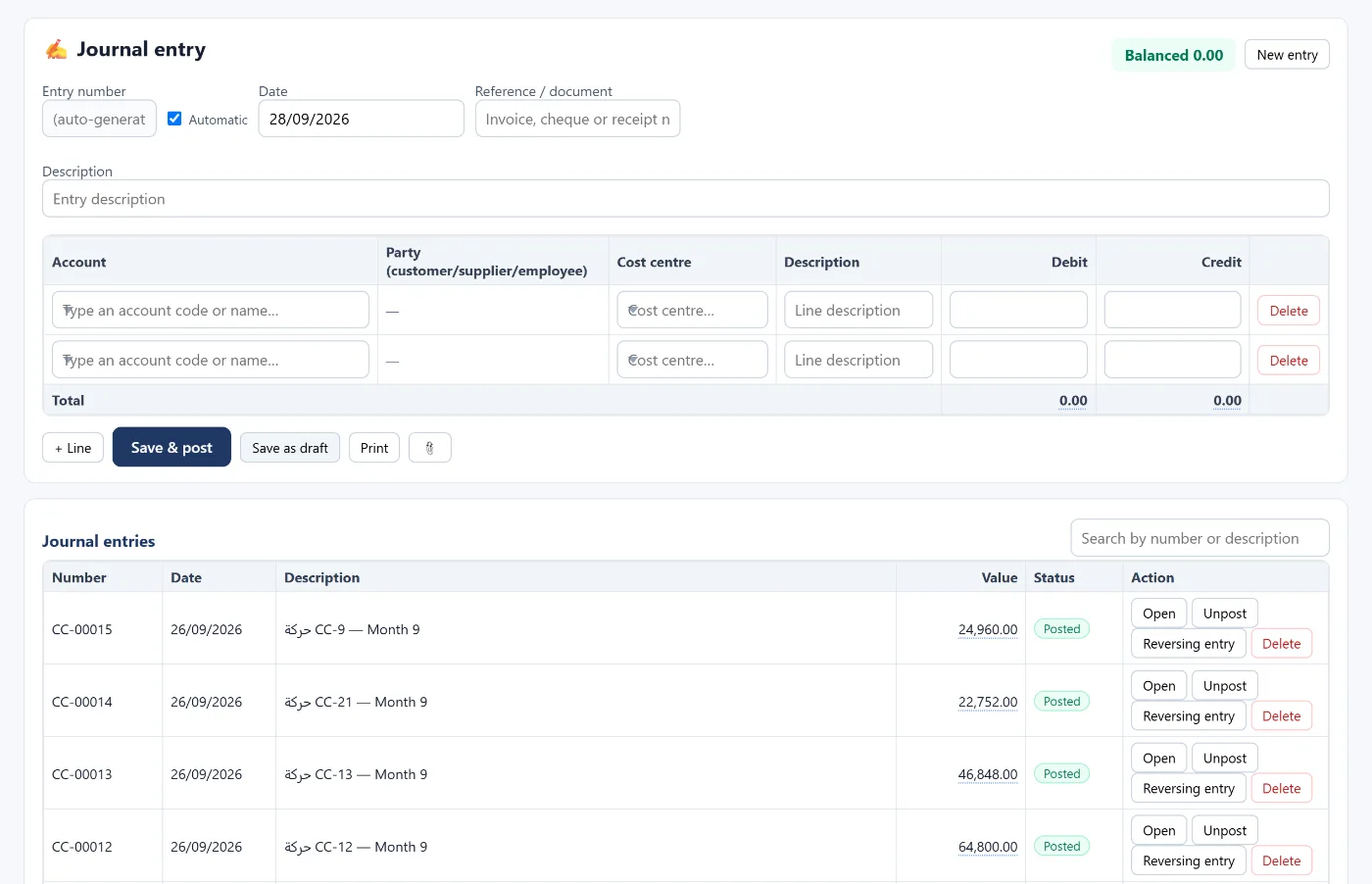
The journal entry is the smallest unit of accounting: every transaction is recorded with a debit side and a credit side of equal amounts. Every report — from the trial balance to the financial statements — is built from these entries.
Parts of an entry
- Date and number — an automatic sequential number, or a manual one that isn't repeated.
- Reference — the invoice, cheque or receipt number.
- Description — what happened, in a clear sentence an auditor will understand a year later.
- Lines: each with an account, a debit or a credit (never both), and a description.
Rules that don't bend
- Balance: total debits = total credits, or the entry can't be posted.
- Posting accounts only: nothing is posted to a summary parent account.
- A party on customer, supplier and employee accounts: so the amount shows in that party's own statement, not just the total balance.
Drafts and posting
A draft is a saved entry that doesn't affect the books yet — useful while you wait for a document or an approval, and it can be saved unbalanced. Posting makes the entry part of the books and reports.
Reverse instead of editing
If you find an error in a posted entry, don't edit or delete it: record a reversing entry that flips its lines — dated today, on the entry's own date, or the first of next month — then record the correct entry. The full trail stays visible to reviewers.
How Tasaheel Accounts manages entries
- Journal entry: automatic number, date, reference, description, and lines with account, party (shown for customer, supplier and employee accounts) and cost centre, with a "balanced" or "unbalanced" badge and the difference, plus attachments.
- Save and post or save as draft, and print.
- Safeguards: no posting to parent accounts and no entries in closed periods, with budget control and approval workflow if you turn them on. Editing or un-posting a posted entry is for the manager only.
- Reversing entry in one click, once per entry, and never dated before the original.
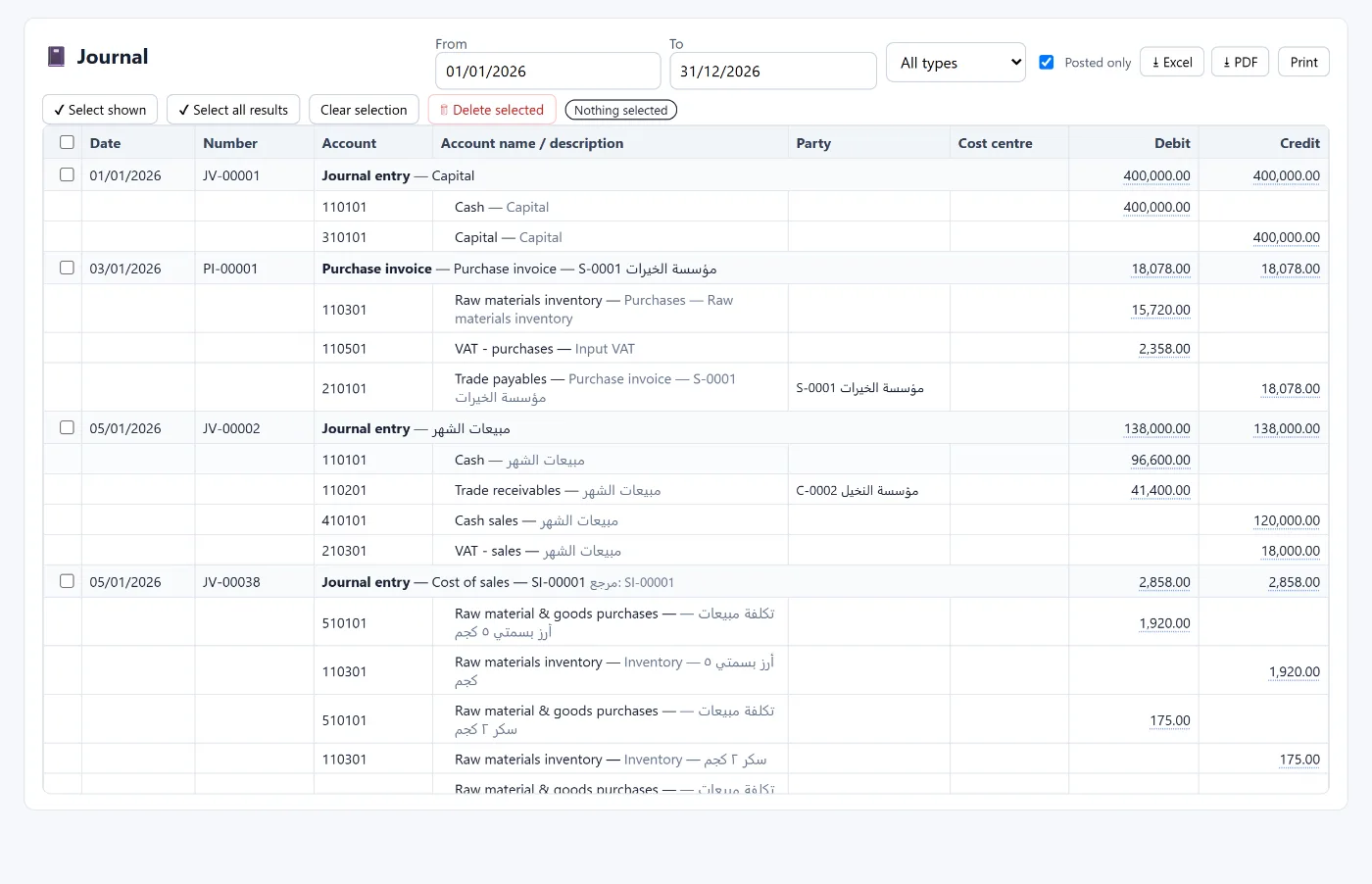
- Day book: every entry line with date, number, account, party and cost centre, filtered by type (entries, receipt and payment vouchers, opening) and exportable.
Read also the trial balance and general ledger and adjusting entries, or learn more about Tasaheel Accounts.
FAQ
Why can't an unbalanced entry be posted?
Because every transaction has two equal sides — a difference means a wrong amount or a missing line.
Should I edit a posted entry with a mistake?
Better to reverse it and record the correct entry, so the correction stays visible.
When do I use a draft?
When you're waiting for a document or an approval, or the figures aren't complete yet.
Why is a party required on some lines?
Customer, supplier and employee accounts need to know whose amount it is, so their statement is right.
Try it in Tasaheel: create a free account, and record and post your first journal entry.