 Tasaheel ERP
E-Invoicing in Saudi Arabia: The Two Phases Explained
A plain guide to e-invoicing (Fatoora) in Saudi Arabia: the generation and integration phases, the data every invoice needs, and how to prepare.
 By Sherif Fadl — Founder, Tasaheel ERP
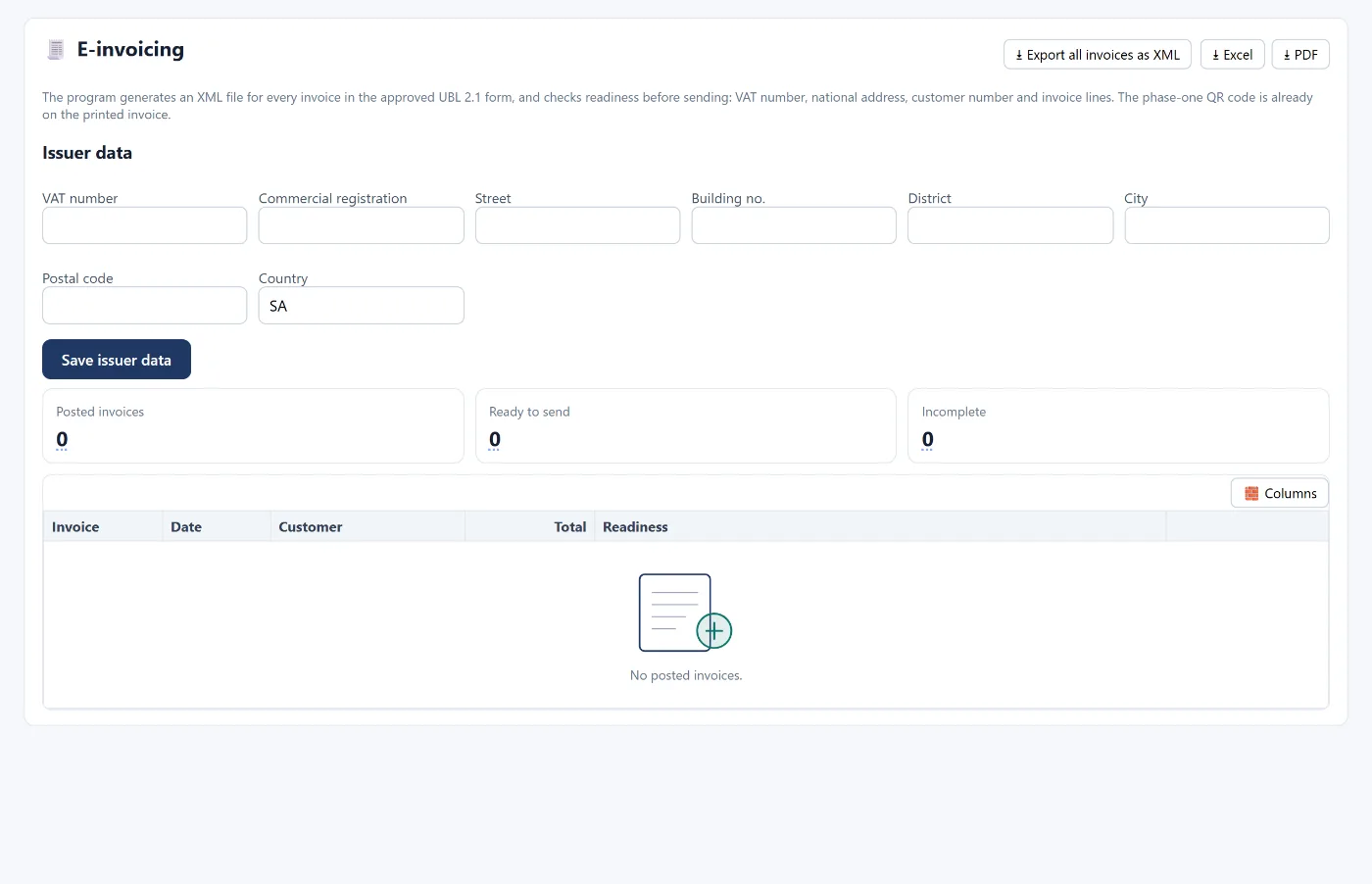
The Zakat, Tax and Customs Authority (ZATCA) requires businesses registered for VAT to issue their invoices electronically, in two phases. This guide explains the difference between the phases, the data an invoice must carry, how to prepare your business, and then exactly what Tasaheel Accounts provides in each phase.
This article is general guidance. The official reference for requirements and dates is the ZATCA website.
What is an e-invoice?
An e-invoice is issued and stored in a structured electronic format through an electronic system. A scanned paper invoice or a hand-typed PDF is not an e-invoice. The aim is consistent invoice data, less tampering and easier tax compliance.
Phase one: generation
Phase one (generation) started on 4 December 2021. Its key points:
- Invoices are issued and stored through an electronic system instead of by hand.
- A simplified tax invoice (usually to consumers) carries a QR code containing basic data such as the seller's name and VAT number, the invoice date, its total and the VAT amount.
- A standard tax invoice (usually business to business) includes the buyer's details, including their VAT number if registered.
Phase two: integration
Phase two started on 1 January 2023 and is applied to businesses in waves set by ZATCA, with each wave notified in advance. In this phase:
- The invoice is issued as XML following the UBL 2.1 standard.
- The invoicing system must connect to ZATCA's Fatoora platform, and technical elements such as a unique identifier and a cryptographic stamp are added.
- Standard invoices are sent to ZATCA for clearance before being given to the buyer; simplified invoices are reported within a set time after issue.
If your wave has not been notified yet, what you need now is to meet phase one and prepare for phase two.
Data that must be right first
Most rejected invoices and compliance delays are not technical — they are missing data. Make sure of:
- Your business VAT number (15 digits) and commercial registration.
- The full national address: street, building number, district, city and postal code.
- Customer details for standard invoices, including their VAT numbers.
- Invoice lines: description, quantity, price and VAT rate on every line.
- Invoice numbering without gaps or duplicates.
Preparing your business step by step
- Check that you are VAT registered and whether you have been notified of an integration wave.
- Use a system that issues invoices electronically and puts a QR code on simplified invoices.
- Complete your issuer details and national address in the system.
- Clean up customer data, especially credit customers and those who get standard invoices.
- Check your current invoices: do they carry all required data in valid XML?
- When your wave is notified, switch on the Fatoora integration before the deadline.
What Tasaheel Accounts provides
The current status, stated precisely:
- Phase one ✓: a QR code is on the printed invoice, and invoices are issued and stored electronically with automatic, separate numbering.
- UBL 2.1 XML invoices and a readiness check for phase two ✓: the e-invoicing screen generates an XML file for each invoice and checks it before submission: VAT number, national address, customer number and invoice lines. All invoices can be exported as XML at once.
- Direct integration with the Fatoora platform (phase two): in progress, and will be switched on from settings with an OTP code once complete.
VAT from the invoice to the return
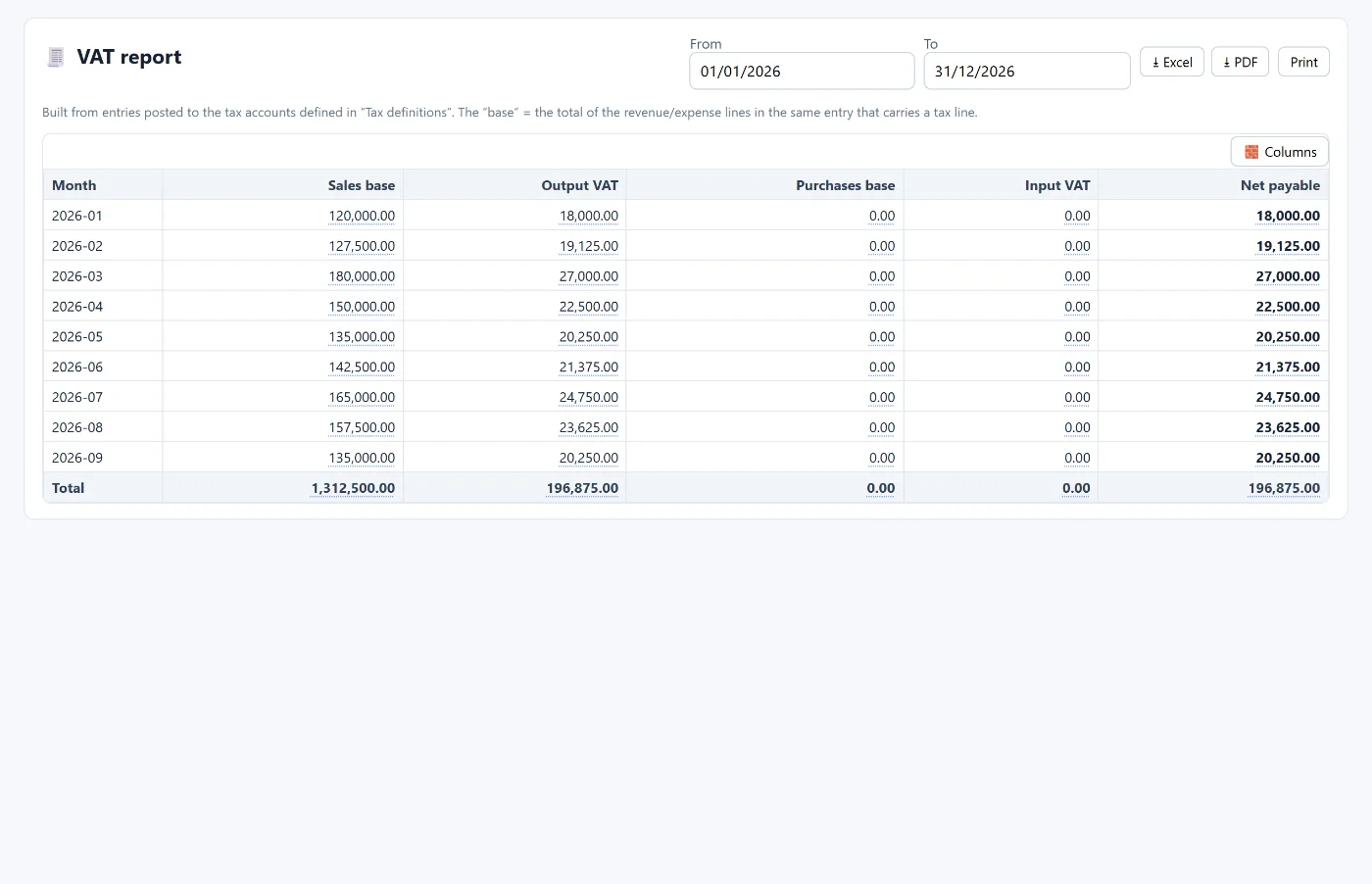
E-invoicing is part of a bigger picture: every sales or purchase invoice in Tasaheel posts its entry with output or input VAT. The VAT report builds the base and the tax month by month from the entries themselves, and the VAT returns screen groups each period (quarterly, for example) and locks it after filing; any entry that lands in a locked period shows as an adjustment and is carried to the next return.
FAQ
Is a PDF enough to count as an e-invoice?
No. An e-invoice is issued and stored through an electronic system in a structured format; a PDF or a picture of a handwritten invoice is not enough.
What is the difference between a standard and a simplified tax invoice?
A standard invoice is usually between businesses and includes the buyer's tax details; a simplified invoice is usually to consumers and carries a QR code.
When does phase two apply to my business?
It is applied in waves set by ZATCA, and each business is notified of its date in advance. Check the ZATCA website for details.
Is Tasaheel connected to the Fatoora platform now?
Not yet. Phase one, UBL 2.1 XML and the readiness check are available now; direct integration with the Fatoora platform is in progress and will be switched on from settings with an OTP code once complete.
Does the program prepare the VAT return?
Yes. It groups output and input VAT for each period from the entries, and the period can be locked after filing.
To see how this works in your business, read accounting software for restaurants and accounting software for contractors, or learn more about Tasaheel Accounts.
Try it in Tasaheel: create a free account, complete your issuer details, and issue your first invoice to see the QR code and the XML readiness.