 Tasaheel ERP
Chart of Accounts: How to Build It and Map It to Statements
How to build a sound chart of accounts: levels, parent and posting accounts, account nature, mapping to financial statement lines, activity accounts, and Excel import.
 By Sherif Fadl — Founder, Tasaheel ERP
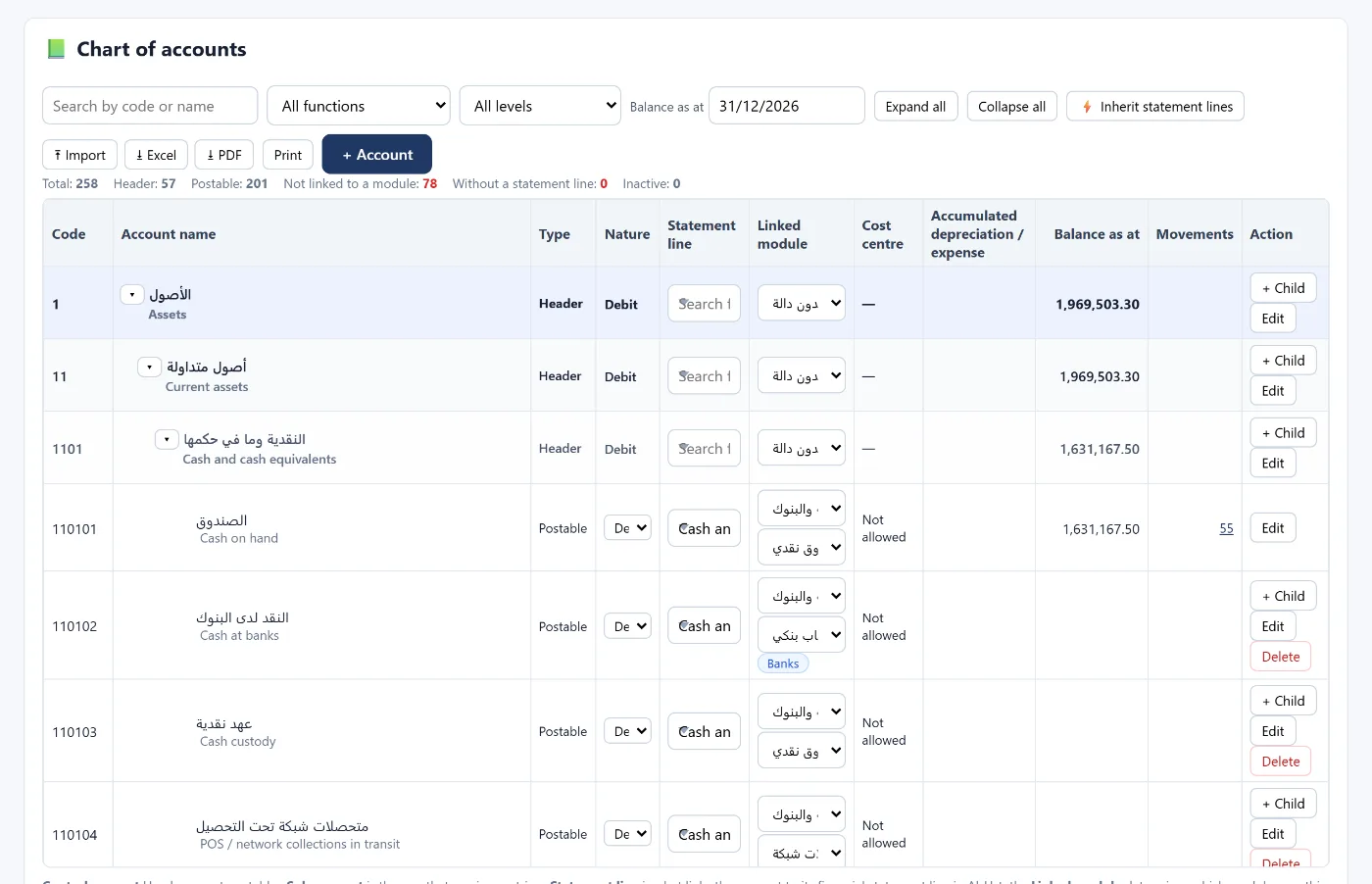
The chart of accounts is the backbone of the books: every entry is posted to one of its accounts, and every financial statement is built from their balances. An orderly chart means correct reports from day one; a messy one means endless corrections.
Levels: parent and posting accounts
The chart is a tree of codes: the first level (assets, liabilities, equity, revenue, costs and expenses), groups beneath it, then detailed accounts.
- A parent account is a summary: it totals the accounts beneath it and takes no postings.
- A posting account is the one that receives entries.
Account nature
Each account has a debit nature (assets and expenses) or a credit nature (liabilities, equity and revenue), inherited from its parent. The nature is what tells you a balance is "against its nature" and needs review.
Mapping to financial statement lines
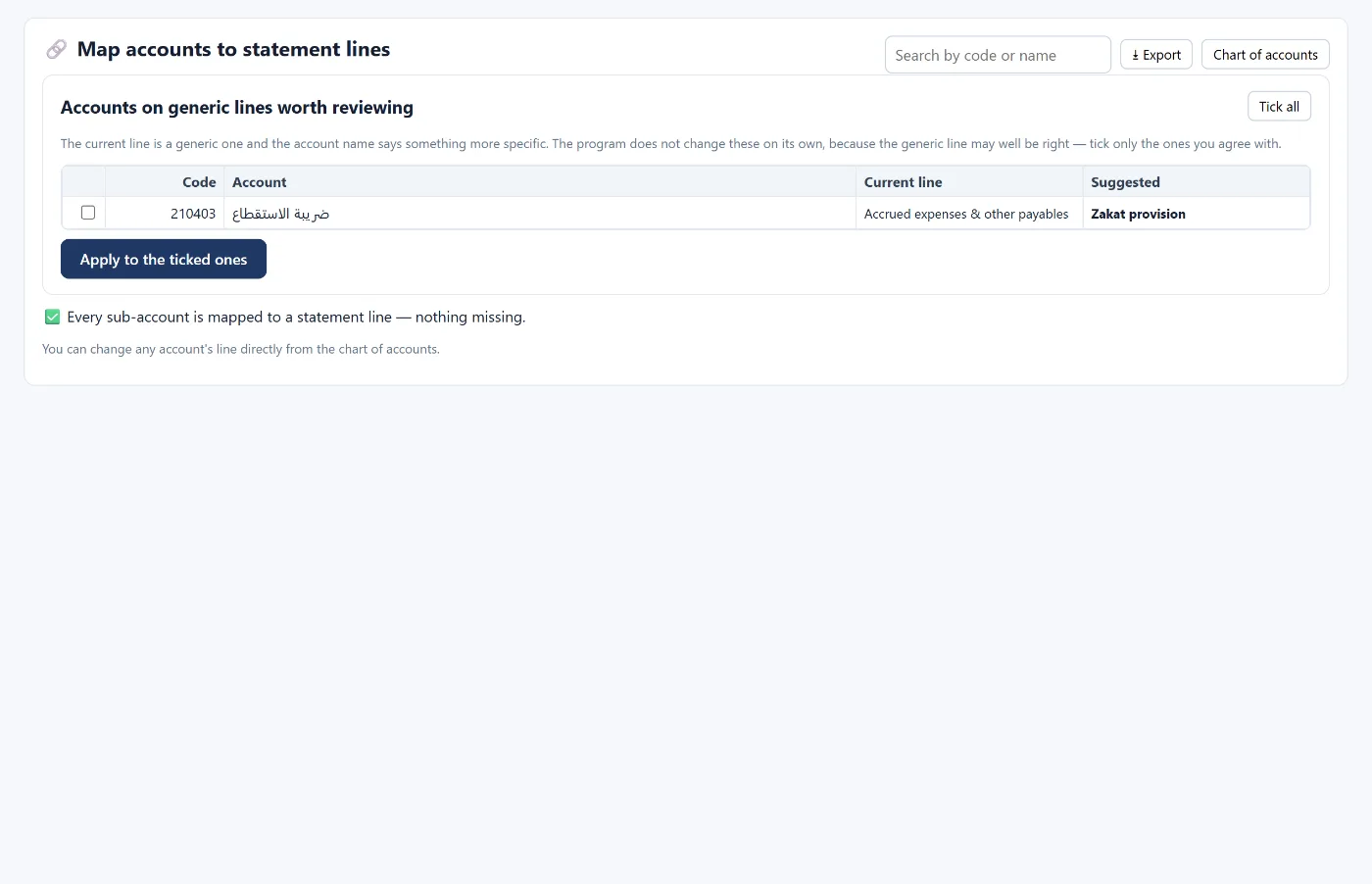
The code alone is not enough: every account must be mapped to a financial statement line (cash, receivables, inventory, revenue, cost of sales…) so it appears in the right place in the statement of financial position or the income statement. An unmapped account may not appear in the statements at all.
Rules that protect the books
- An account with movements or sub-accounts cannot be deleted — deactivate it instead.
- An account with movements cannot become a parent or have accounts added beneath it: open the new account next to it.
- Customers and suppliers are opened under their control accounts from the parties screens, not directly in the chart.
How Tasaheel Accounts manages the chart
- A ready chart for Saudi businesses, and the activity type chosen when creating the company adds accounts for your line of business (restaurants, contracting, retail, manufacturing, clinics and more).
- Chart of accounts: search, filter by level, balance up to a date, and the number of movements per account (opening the ledger), with indicators for accounts that are unmapped, without a statement line, or inactive.
- New account: parent and the next code automatically, Arabic and English names, nature, statement line, linked function (sales, inventory, banks…), cost centre, and accumulated depreciation and expense accounts for asset accounts.
- Mapping accounts to statement lines: the program suggests the line from the account name and its parent, and you approve the suggestions in one go, with a review of accounts mapped to general lines.
- Import your chart from Excel: reads any numbering, attaches each account to its nearest parent, and updates existing accounts rather than duplicating them.
Read also how to read your financial statements and opening balances, or learn more about Tasaheel Accounts.
FAQ
What is the difference between a parent and a posting account?
A parent totals the accounts beneath it and takes no postings; a posting account receives entries.
Can I use my existing chart of accounts?
Yes, by importing it from Excel with any numbering, then mapping the accounts to statement lines.
Why doesn't an account appear in the income statement?
Usually because it is not mapped to a statement line — map it from the account mapping screen.
Should I delete an account I no longer use?
If it has movements it cannot be deleted; deactivate it so its history stays and it is not used in new entries.
Try it in Tasaheel: create a free account, choose your activity type, and review the ready chart.