 Tasaheel ERP
Opening Balances: How to Start on a New Accounting System
How to enter opening balances on a new system: keeping them balanced, customer and supplier balances, Excel import, and fixed assets with their depreciation.
 By Sherif Fadl — Founder, Tasaheel ERP
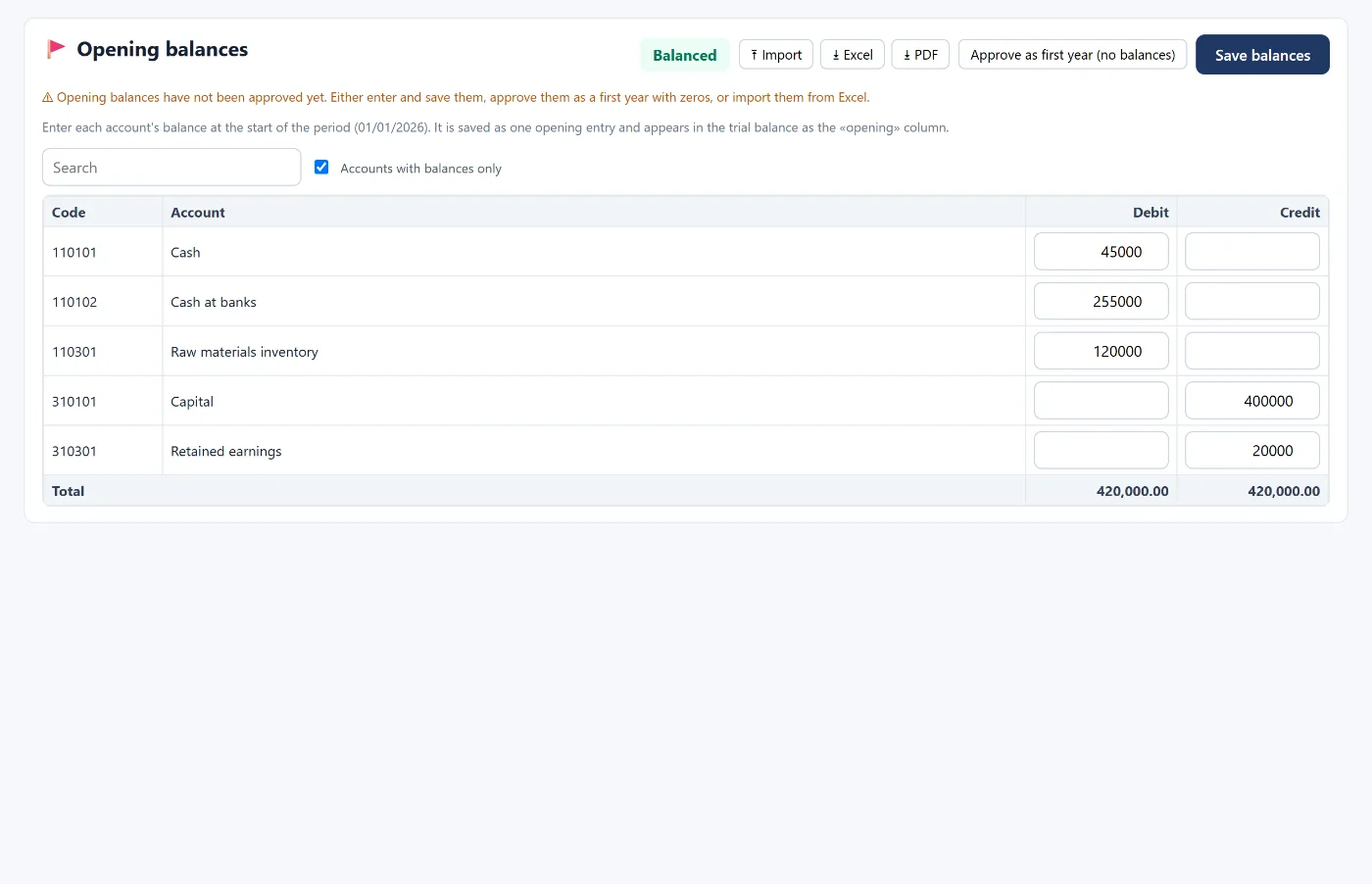
When you move to a new accounting system you don't start from zero: you have cash, banks, customers, suppliers and assets. Opening balances are the starting point every later report is built on — and any mistake in them carries into everything after.
Rule one: balance
Opening balances are a single entry: total debits = total credits. The right source is the trial balance on the last day before the period starts (usually 31 December). If it doesn't balance, a balance is missing or duplicated, and you must find it before saving.
Customer and supplier balances
Entering "receivables" as one total is not enough: enter each customer's and supplier's balance separately, or statements and ageing won't be right from day one.
Fixed assets
For each asset, enter its cost and its accumulated depreciation up to the start date, so the program continues depreciating from where it stopped and does not depreciate earlier months again.
A business's first year
If this is your business's first year and there are no earlier balances, simply confirm it as the "first year" with zero balances.
How Tasaheel Accounts manages opening balances
- Opening balances: a debit or credit balance for each posting account, with a "balanced" or "difference" badge, saved as a single opening entry dated at the start of the year that shows in the trial balance as the "opening" column. An unbalanced entry cannot be saved.
- Party balances: customer and supplier control accounts have a button to enter each party's balance, so it appears in their statement and ageing.
- Import from Excel: a ready template with code, party, debit and credit, previewing the difference and accounts not found; or import earlier movements rolled into the opening entry; or import customers and suppliers with their balances.
- Assets and prepayments: import the asset register with accumulated depreciation, and the opening-balance depreciation screen creates fixed asset, prepaid expense and deferred revenue cards and schedules from the balances themselves.
- The program reminds you on the dashboard and the close checklist while balances are not confirmed. In later years, balances carry forward automatically from year-end closing.
Read also the chart of accounts and fixed assets and depreciation, or learn more about Tasaheel Accounts.
FAQ
Where do I get opening balances from?
From the trial balance on the last day before the period starts, from your previous system or your accountant.
Do I enter each customer's balance or just the total?
Each customer's and supplier's balance separately, so statements and ageing are correct.
What if the balances don't balance?
The entry can't be saved unbalanced — review the previous trial balance until you find the difference.
Do I need to enter balances every year?
No. After the first year, balances carry forward automatically from year-end closing.
Try it in Tasaheel: create a free account, and enter your opening balances or import them from Excel.