 Tasaheel ERP
Receivables and Payables Ageing Reports: Reading and Collecting
How to read customer and supplier ageing: bands and as-of date, statements, credit limits, a due-date collection worklist, promises to pay and supplier payments.
 By Sherif Fadl — Founder, Tasaheel ERP
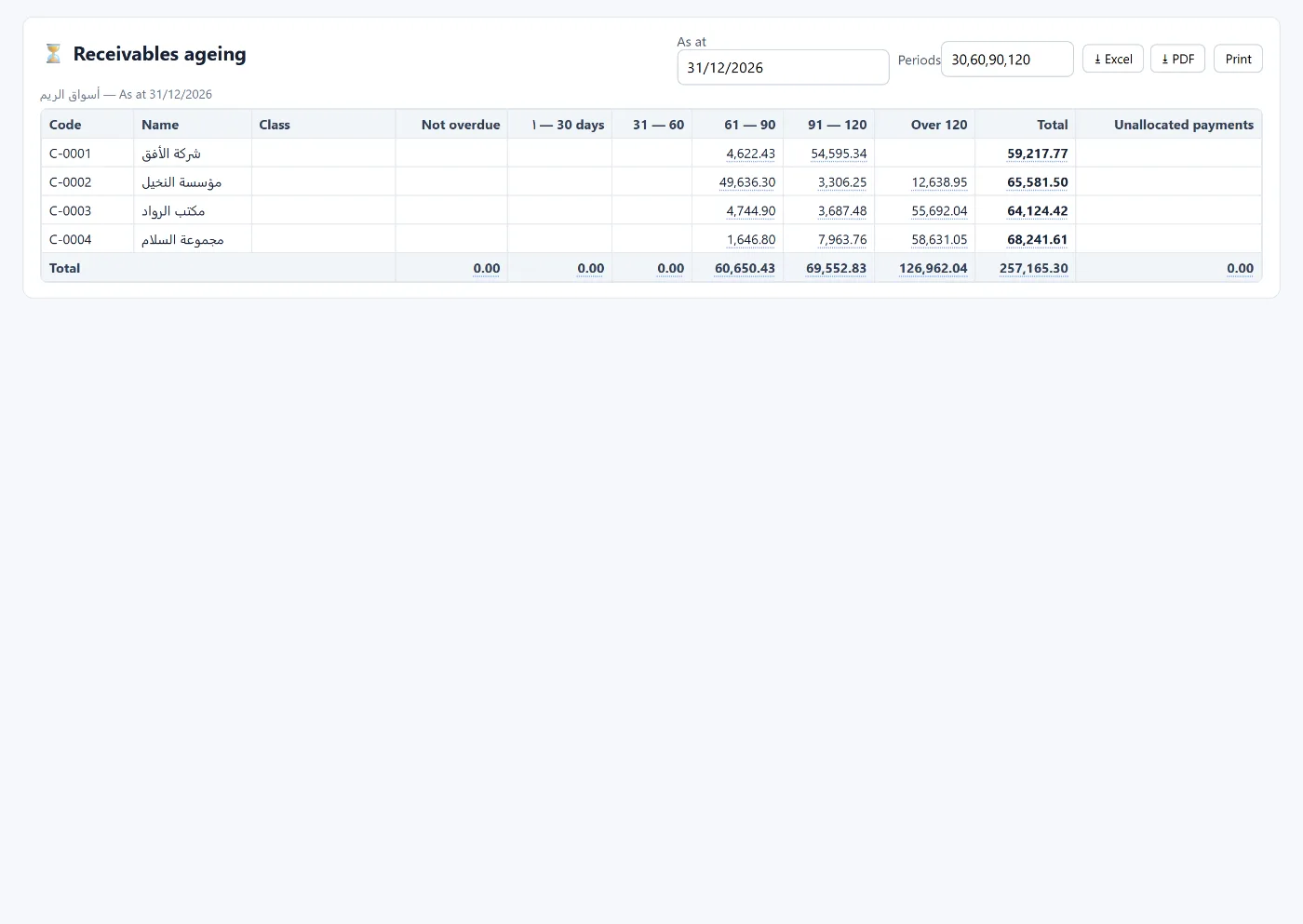
A customer's balance alone is not enough: SAR 100,000 that is a week old differs from 100,000 that is a year old. The ageing report spreads each customer's or supplier's balance over time bands, showing where the risk is and where collection should start.
How the ageing report is built
- As-of date: usually month end.
- Bands: by default 1–30, 31–60, 61–90, 91–120 and over 120 days, and you can change them.
- Applying payments: payments are set against the oldest transactions first, so what remains is genuinely the most recent. Payments with no matching transactions appear in an "unallocated payments" column.
Reading the report
- Balances concentrated in the older bands signal weak collection or a disputed invoice.
- A large customer in a late band is riskier than many small ones.
- In supplier ageing you see what is due soon and whom you have kept waiting, so you protect the relationship.
From the report to collection
- Customer statement: every transaction between two dates with the opening and running balance, ready to print and send.
- Collection worklist: open invoices by due date (not yet due, 1–30, 31–60, 61–90, over 90), recording promises to pay and tracking which were kept and which broken, with bulk reminders.
- Credit limit: each customer has a limit, credit period and grace days, and the program blocks or warns on an invoice that takes the balance over the limit or when an invoice is overdue beyond the period.
Suppliers: the payment proposal
Lists supplier invoices due up to a date you choose, so you select what to pay, and it creates the payment vouchers and a bank transfer file.
Common mistakes
- A payment not linked to a customer, so the debt stays open in the report.
- A customer with no payment terms, so nobody knows when they become overdue.
- Looking only at the balance and not at its age.
How Tasaheel Accounts manages ageing
- Receivables ageing and payables ageing with an as-of date and editable bands, per customer or supplier with their category.
- Customer / supplier statements on the business letterhead.
- The collection worklist by due date with promises to pay.
- Credit management with limit, period, grace days and credit hold.
- The payment proposal for suppliers.
- And the dashboard shows the latest arrears over 90 days.
Read also accounting software for wholesale and distribution and cash flow management, or learn more about Tasaheel Accounts.
FAQ
What is the difference between the ageing report and the collection worklist?
The ageing report spreads the balance over bands from the transaction date; the collection worklist shows open invoices by due date with promises to pay.
Can the ageing bands be changed?
Yes. You enter the bands that suit you, such as 15, 30 and 60.
How is a partial payment treated?
It is set against the oldest transactions first, so the most recent stay in their bands.
Does the program stop sales to a customer in arrears?
Yes, if credit limits are on: it blocks the invoice or warns, depending on the setting.
Try it in Tasaheel: create a free account, record your customers' invoices and collections, and open the ageing report at month end.